> For the complete documentation index, see [llms.txt](https://docs.wasabi.xyz/_/llms.txt). Markdown versions of documentation pages are available by appending `.md` to page URLs; this page is available as [Markdown](https://docs.wasabi.xyz/_/overview/technical-documentation/depositor-snapshots.md).
# Depositor Snapshots
A depositor snapshot is a way to capture who was deposited into a specific vault at a specific moment, so you can include addresses in rewards, allowlists, or campaigns.
Below is a practical workflow to snapshot vault depositors and convert vault-share balances into the underlying token amounts.
#### 1) Export the vault holder list (CSV)
1. Open the vault you want to snapshot on [Wasabi](https://app.wasabi.xyz/earn).
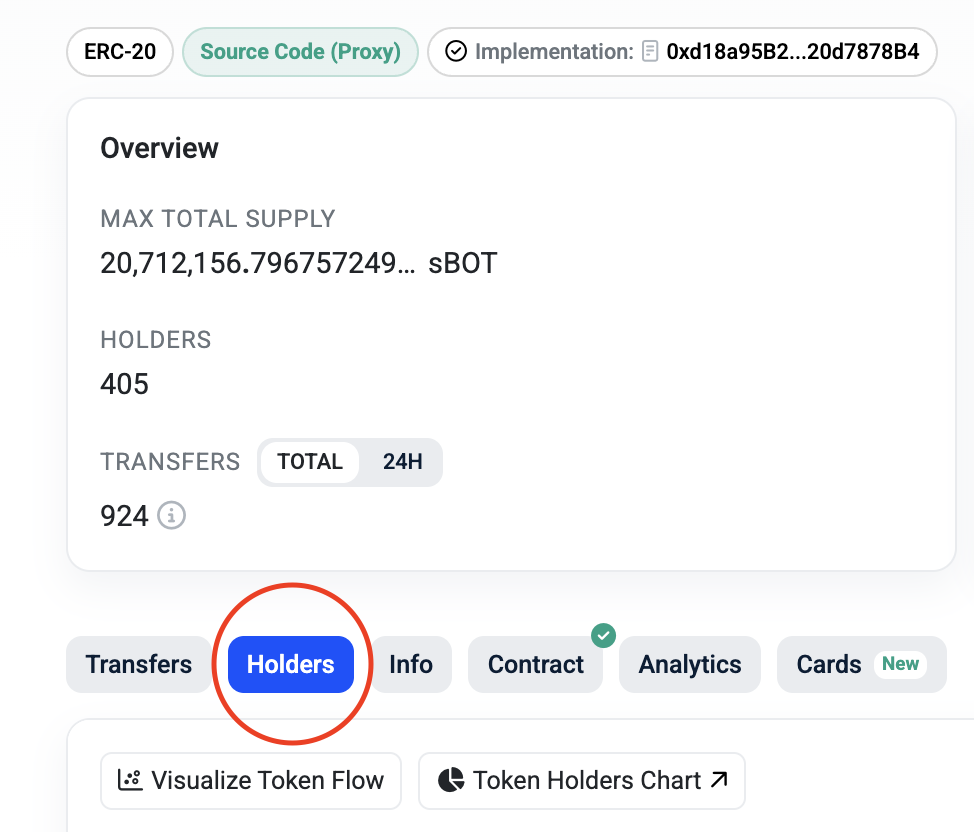
2. Click the Explorer icon to open the vault token contract on the chain explorer.
3. In the explorer:
* Go to Holders
* Click CSV Export
You’ll now have a CSV containing at least:
* HolderAddress (wallet address)
* Balance (the vault token balance, e.g., sTOKEN)
**Important**: this Balance is not the final token amount. It represents vault shares (the vault receipt token), not the underlying token amount.
***
#### 2) Find the current redemption rate (shares → underlying)
To convert vault shares to underlying token amounts, you need the redemption rate (sometimes called share price). The simplest way to derive it is from the most recent deposit or withdraw transaction:
1. Find the most recent deposit/withdraw transaction for the vault (via the explorer / transfers).
2. Identify both values from that transaction:
* Non-spicy amount = underlying token amount (e.g., BOT)
* Spicy amount = vault share amount (e.g., sBOT)
3. Calculate the remption rate by dividing the non-spicy amount by the spicy amount:
Redemption Rate = Non-spicy amount ÷ Spicy amount
This value should always be > 1 (and will increase over time as rewards accrue).
*In the example above, we calculate 851.496 (BOT) / 833.429 (sBOT) = \~1.0217*
***
#### 3) Convert balances in a sheet (i.e. Google Sheets)
1. Import the CSV into Google Sheets or a program of your choice.
2. Add a new column like TrueBalance.
3. Multiply each wallet’s Balance by the redemption rate.
Example formula (if Balance is in column B and your redemption rate is 1.0217):
\=B2 \* 1.0217
Drag down to apply it to all rows.
***
#### Result
You now have:
* HolderAddress (the depositor wallet)
* TrueBalance (estimated underlying token amount at the moment you exported the CSV)
**That’s your depositor snapshot** - a clean, reproducible dataset you can use for rewards, allowlists, or community campaigns.
#### Notes & best practices
* Snapshot is time-based. If deposits/withdrawals happen after export, they won’t be reflected.
* Record the metadata alongside your sheet: vault name, export timestamp, redemption rate used, and the tx hash you sourced it from.