> For the complete documentation index, see [llms.txt](https://docs.wasabi.xyz/_/llms.txt). Markdown versions of documentation pages are available by appending `.md` to page URLs; this page is available as [Markdown](https://docs.wasabi.xyz/_/vietnamese/guides/thuc-hien-mot-quyen-chon.md).
# Thực hiện một quyền chọn
Thực hiện quyền chọn để tiến hành các giao dịch quyền chọn và kiếm lợi nhuận.
Bạn có thể thực hiện một quyền chọn tại bất kỳ thời điểm nào trước khi nó hết hạn. Khi một quyền chọn được mua, nó sẽ xuất hiện dưới trang [Quyền chọn của tôi](https://wasabi.xyz/my/options). Tại đây, bạn có thể xem chi tiết các quyền chọn của mình, thực hiện chúng và các hành động khác.
Xem các quyền chọn của bạn và điều khiển tụi nó!
## Quyền chọn Call
Khi thực hiện quyền chọn Call của mình, bạn sẽ có thể mua tài sản dự trữ với giá strike price. Trước tiên, bạn cần phê duyệt việc chuyển ERC-20 token và sau đó mua tài sản.
Exercising a Call option
## Quyền chọn Put
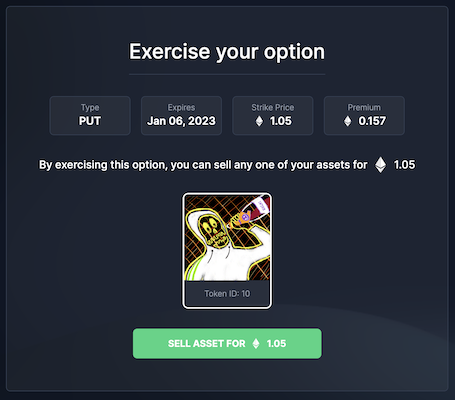
Khi thực hiện quyền chọn Put, bạn sẽ có thể bán bất kỳ tài sản nào của mình từ bộ collection đó với giá strike price. Trước tiên, bạn cần phê duyệt việc chuyển tài sản NFT và sau đó bán nó